
Dynamics 365 for Fundraising: A Practical Overview for Development Teams
Dynamics 365 becomes a fundraising CRM when you pair it with a clean Dataverse foundation, a nonprofit-friendly data model, and a small set of repeatable fundraising workflows (stewardship, pledges, recurring gifts, moves management). The win is not a “fancier database.” It’s consistency: one constituent record, one gift history, reliable follow-up tasks, and reporting that aligns with Finance. Most failures come from rushed data decisions and skipped training, not from the platform.
Why fundraising teams are re-looking at Dynamics now
In 2026, development teams are under pressure to do more with less time: faster donor follow-up, cleaner reporting, and fewer spreadsheet detours. At the same time, many nonprofits are standardizing on Microsoft for security, collaboration, and analytics. Dynamics 365 can work well in that environment, but only if it is implemented with discipline: clear gift definitions, governance, and adoption design.
What “Dynamics 365 for Fundraising” actually means
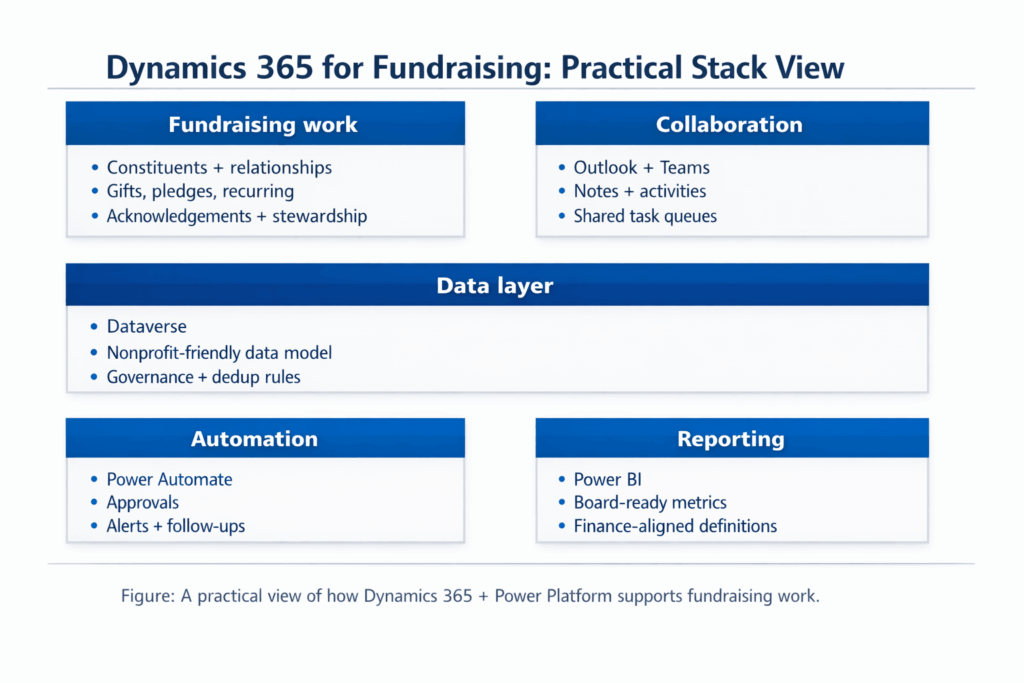
There isn’t a single button you press to “turn on fundraising.” What nonprofits typically mean is:
• Dynamics 365 as the CRM platform
• Dataverse as the data layer (where constituent and gift data lives)
• A nonprofit-friendly data model and configuration
• Automation + approvals through Power Automate
• Reporting through Power BI
• Everyday collaboration through Outlook and Teams
You can also choose a purpose-built fundraising CRM built on Dynamics 365, such as SylogistMission CRM, if you want packaged nonprofit fundraising patterns.
Day-to-day: what your team should be able to do (without database drama)
- Search a constituent and trust the profile (contact info, relationships, communication preferences).
- See a clean giving history across gifts, pledges, recurring schedules, adjustments, and designations.
- Segment lists the way fundraisers think (lapsed donors, LYBUNT/SYBUNT, major gift pipeline stages, event attendees who never gave).
- Trigger follow-ups automatically (thank-you tasks, pledge reminders, stewardship touchpoints).
- Produce leadership reporting that answers “so what?” (pipeline by stage, renewal trends, campaign performance).
The part most teams underestimate: data foundations
A CRM only feels “easy” when its definitions are boring and consistent. Before you automate anything, lock these down:
- Gift model definitions: gift vs pledge vs payment vs adjustment, plus how you handle soft credits and refunds.
- Fund and campaign coding: designations, restrictions, appeals, fiscal years, and ownership of those fields.
- Duplicates and merges: matching rules, who can merge, and how you prevent re-duplication.
- Security and sensitivity: who can see major donor notes, and how changes are audited.
- Source of truth: which system owns email, address, consent flags, and employer data.
Two implementation paths (choose the one that matches your reality)
Path A: Generic Dynamics 365 fundraising build
Best when you want maximum flexibility and you’re ready to define processes, build workflows, and iterate. This path rewards strong governance and internal ownership.
Path B: Purpose-built fundraising CRM on Dynamics 365 (SylogistMission CRM)
Best when you want packaged nonprofit fundraising patterns and faster time-to-value. You still need disciplined data and training, but you can reduce design time by starting from proven structures.
What to avoid (the potholes that swallow budgets)
- Trying to recreate your old database exactly. Migrating old clutter into a modern platform doesn’t create clarity.
- Customizing before you define data rules. You’ll build workflows on top of disagreements.
- Skipping a gift definitions workshop. This one meeting prevents months of reporting fights.
- Underfunding training and expecting adoption to happen by vibes.
- Going live without testing the ugly edge cases: refunds, failed recurring gifts, pledge write-offs, and consent rules.
Where Adovent fits
Adovent implements Microsoft-based CRMs for nonprofits with an adoption-first approach. We focus on a defendable Dataverse foundation, disciplined migration and validation, and workflows that fundraising teams actually use. We also plan training as part of the deliverable, not as an optional add-on.
A simple scoping checklist (use this before you buy)
- What are our top 5 fundraising motions (annual fund, major gifts, grants, events, memberships) and what is “done” for each?
- Which channels matter most (online giving, mail, peer-to-peer, text, events) and what needs to integrate at launch?
- What are our non-negotiable acknowledgement and receipting requirements (compliance + donor experience)?
- What are the top 10 reports leadership and Finance expect, and what definitions do they depend on?
- Who owns data governance after go-live, and what is the monthly cleanup rhythm?
- What is our training plan by role, and how will we measure adoption?
FAQs
Is Dynamics 365 a good CRM for fundraising?
Yes, when implemented with a nonprofit-friendly data model, clear gift definitions, and repeatable workflows. Dynamics is a platform. Outcomes depend on governance, migration quality, and adoption.
Do we need Power Automate?
If you want reliable follow-ups, approvals, and “no one forgets” workflows, Power Automate is usually part of the stack. Start with 5–8 workflows, then expand after adoption stabilizes.
Can we choose a packaged option on Microsoft?
Yes. If you want packaged nonprofit fundraising patterns on Dynamics 365, SylogistMission CRM is one option to evaluate. Even with packaged solutions, data definitions and training remain essential.
