

Nonprofit CRM in 2026: What ‘Good’ Looks Like (and What to Avoid)
A “good” nonprofit CRM in 2026 is one your team trusts daily: clean constituent records, a consistent gift history, fast follow-up workflows, and reporting that holds up in a leadership or finance meeting. The platform matters, but outcomes matter more. For Microsoft-based CRMs, that usually means Dynamics 365 + Dataverse with a nonprofit-friendly data model, a few high-value automations, and an implementation partner who treats data definitions, migration testing, and training as first-class work.
Why ‘good’ looks different in 2026
Most nonprofits aren’t asking for “more features.” They’re asking for less chaos: fewer duplicate records, fewer manual handoffs, and fewer reporting arguments. At the same time, many teams are re-checking their Microsoft fundraising roadmap because Fundraising and Engagement has a defined end of support date in late 2026, which makes modernization planning more urgent.
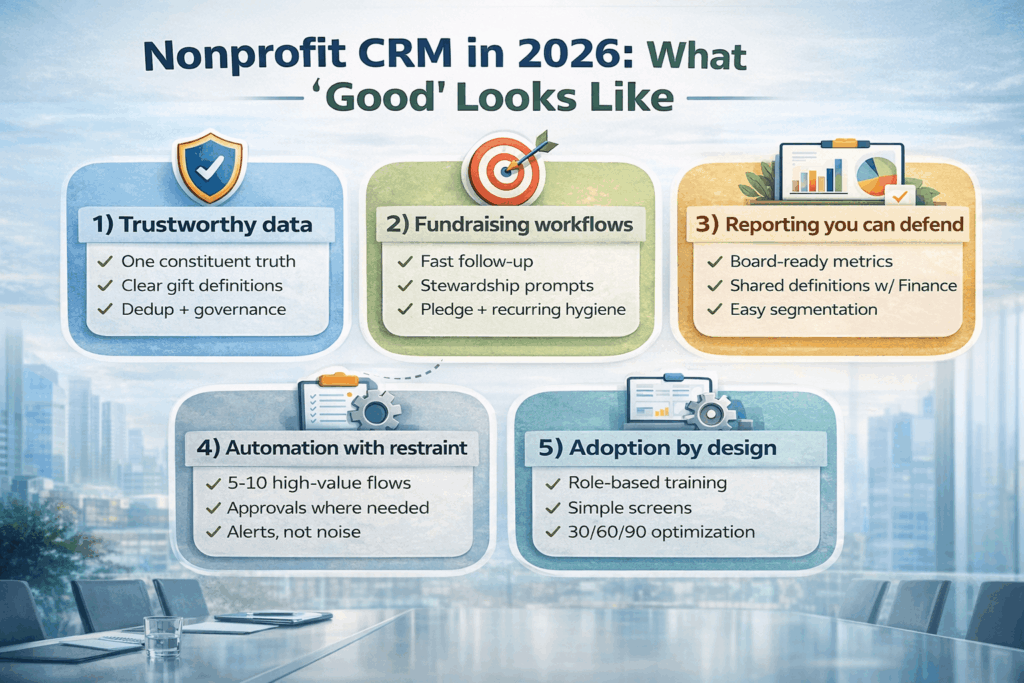
1) Trustworthy data: one constituent truth
A good CRM doesn’t start with dashboards. It starts with trust. That means:
• Duplicate control you can live with (matching rules, merge rules, and clear ownership)
• One definition for gifts, pledges, payments, refunds, soft credits, and designations
• A simple governance rhythm (monthly cleanup, quarterly field reviews, and change requests that don’t derail the system)
2) Fundraising workflows that match how people work
Good CRMs reduce memory work. Your team shouldn’t have to remember what to do next. Look for workflows like:
• Thank-you task creation within hours, not days
• Pledge and recurring gift hygiene (reminders, failures, and follow-ups)
• Moves management that feels practical, not like extra paperwork
3) Reporting you can defend
If your board asks, “How are we doing?” and your answer depends on a spreadsheet hero, the CRM isn’t done. Good reporting has shared definitions with Finance (especially for revenue recognition vs fundraising totals), and the ability to slice results by campaign, designation, channel, and donor segment without manual clean-up.
4) Automation with restraint
In 2026, automation is cheap to build and expensive to maintain. The best teams start with 5–10 workflows that remove repetitive work, like:
• New gift entered → assign stewardship task + due date
• Large gift → trigger acknowledgement workflow + optional approval
• Event attendee → add to follow-up queue based on engagement rules
Then they expand only after staff adoption is stable.
5) Adoption by design
A good CRM is not the one with the longest feature list. It’s the one your team uses without resentment. That requires role-based training, screens that fit each job, and a 30/60/90-day optimization plan post go-live.
What to avoid (the traps that inflate cost and kill adoption)
- Migrating “as-is” without agreeing on gift and constituent definitions first.
- Over-customizing early to replicate an old system’s quirks.
- Building automations before your data is stable (garbage-in becomes faster garbage-out).
- Treating training as optional or pushing it to the last week.
- Skipping end-to-end testing for the edge cases: refunds, failed recurring payments, pledge write-offs, householding rules, and consent preferences.
Microsoft-based CRM options in plain language
If you’re standardizing on Microsoft, there are two common ways nonprofits approach fundraising CRM:
1) A Dynamics 365 + Dataverse foundation with a nonprofit fundraising data model and configuration tailored to your processes.
2) A purpose-built fundraising CRM built on Microsoft Dynamics 365, such as SylogistMission CRM, when you want packaged nonprofit fundraising patterns and faster time-to-value.
In both cases, the implementation quality and data discipline will matter as much as the product choice.
How to evaluate your implementation partner (in one page)
Use these questions in discovery calls. A strong partner answers clearly, without hand-waving:
- How do you run a “definitions workshop” for gifts, pledges, payments, designations, campaigns, and soft credits?
- What is your dedup strategy (matching rules, merge rules, and ownership)?
- How do you test migration end-to-end, including recurring gifts and refunds?
- What does your training plan look like by role, and how do you measure adoption?
- What will you not customize in phase 1, and why?
Where Adovent fits
Adovent implements Microsoft-based CRMs for nonprofits with a simple principle: systems should reduce chaos, not add to it. We focus on a defendable data foundation (Dataverse), disciplined migration and validation, and practical workflows that fundraising teams actually use. Whether you choose a more generic Dynamics 365 approach or a packaged solution like SylogistMission CRM, we design for adoption first.
FAQs
What is the best nonprofit CRM in 2026?
The best CRM is the one your team trusts and uses daily. Look for clean data, clear gift definitions, fast follow-ups, and reporting that aligns with Finance. Platform matters, but implementation discipline matters more.
Is Dynamics 365 good for nonprofits?
Yes, especially when paired with Dataverse and a nonprofit-friendly data model. Success depends on data governance, migration quality, and adoption design.
How do we avoid an expensive CRM implementation?
Define your data and gift rules first, start with a small set of high-value workflows, avoid early over-customization, and budget for training and post-go-live optimization.
