
Packaged vs Custom on Dynamics 365: Choosing the Right Microsoft-Based Fundraising CRM
If you want maximum flexibility and you have the time and governance capacity to design your fundraising processes and data model, a custom Dynamics 365 build can be a great fit. If you want packaged nonprofit fundraising patterns and faster time-to-value on the Microsoft platform, SylogistMission CRM is a common path. The best choice depends on your complexity (gift model, integrations, security needs) and your adoption reality (training budget, admin capacity, and change management).
Why this decision matters (it’s not just features)
Most nonprofits don’t fail because they chose the “wrong CRM.” They struggle because they chose the wrong scope. A platform-first build can drift into endless customization. A packaged solution can be undermined by messy data and skipped training. The goal is to pick a path that matches your operational reality, then execute with discipline.
Two common paths on the Microsoft platform
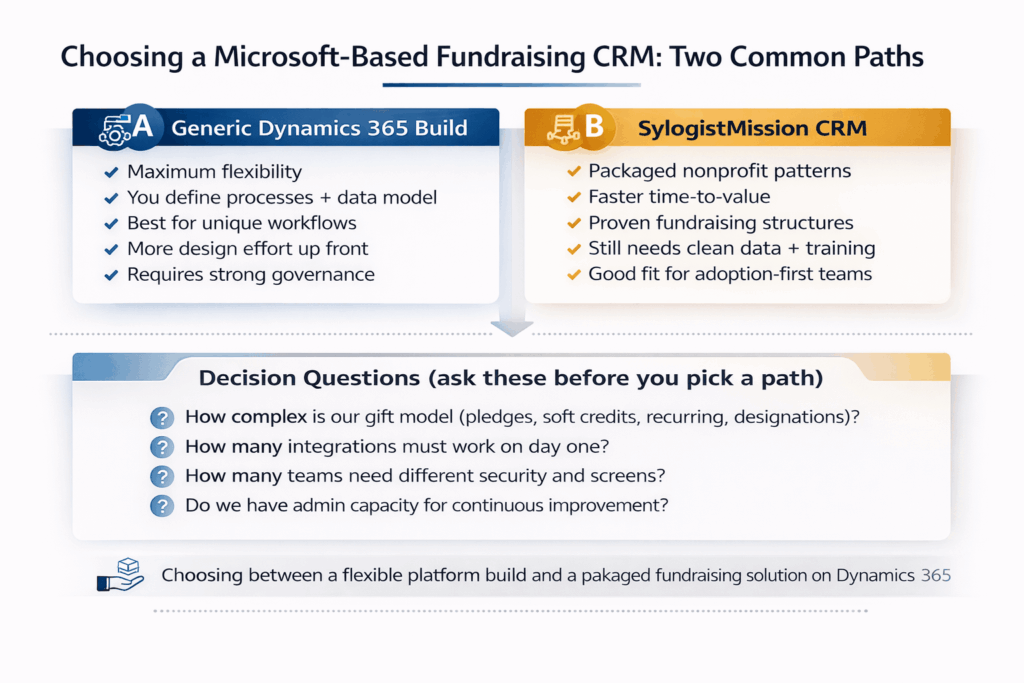
Path A: A custom Dynamics 365 fundraising build (what it’s good at)
- You have unique fundraising motions that don’t map neatly to standard patterns.
- You need deep alignment with Finance definitions and reporting frameworks.
- You have internal admin capacity (or budget) for ongoing iteration after go-live.
- You want full control over screens, fields, security roles, and workflow design.
Watch-outs:
- Discovery and design take longer, because you’re defining your own standard.
- Customization can sprawl if governance is weak.
- Reporting can become inconsistent if gift definitions aren’t locked early.
Path B: SylogistMission CRM on Dynamics 365 (what it’s good at)
- You want packaged nonprofit fundraising patterns and proven structures.
- You’re optimizing for speed and adoption, not custom design.
- You want a Microsoft-based CRM without reinventing basic fundraising building blocks.
Watch-outs:
- You still need disciplined data definitions (gift vs pledge vs payment, designations, refunds).
- Integrations still need end-to-end testing, especially recurring gifts and edge cases.
- If you over-customize too early, you lose the packaged advantage.
Two implementation paths (choose the one that matches your reality)
Path A: Generic Dynamics 365 fundraising build
Best when you want maximum flexibility and you’re ready to define processes, build workflows, and iterate. This path rewards strong governance and internal ownership.
Path B: Purpose-built fundraising CRM on Dynamics 365 (SylogistMission CRM)
Best when you want packaged nonprofit fundraising patterns and faster time-to-value. You still need disciplined data and training, but you can reduce design time by starting from proven structures.
A decision checklist you can use in one meeting
Answer these honestly. The pattern of answers usually makes the choice clear.
Gift complexity: Do we manage pledges, recurring gifts, soft credits, tribute gifts, and multiple designations at scale?
Integration pressure: Which systems must be integrated at launch (online giving, finance, email, events, data warehouse)?
Security needs: Do we need strict role-based access for sensitive donor notes and major gift work?
Reporting maturity: Do we have agreed definitions for revenue, fundraising totals, and campaign attribution?
Adoption reality: Do we have training time, change champions, and a plan for 30/60/90-day adoption?
Admin capacity: Who owns governance and optimization after go-live, and how much time do they truly have?
What to avoid (no matter which path you choose)
- Choosing custom because you’re afraid to standardize anything.
- Choosing packaged but refusing to clean data or define gifts and designations.
- Skipping end-to-end testing for refunds, failed recurring payments, pledge write-offs, and consent preferences.
- Treating training as optional or leaving it to “the week before go-live.”
- Going live without a backlog and ownership model for continuous improvement.
Where Adovent fits
Adovent implements Microsoft-based CRMs for nonprofits with an adoption-first approach. We help you choose the right path, define your gift and constituent rules early, run disciplined migrations and validation, and launch workflows that your development team will actually use. We also keep a 30/60/90-day optimization plan so the system gets better after go-live.
FAQs
Can we start with a packaged solution and customize later?
Yes, but treat customization as a planned phase. Protect the packaged advantage in phase one by standardizing definitions and keeping changes minimal.
Is a custom build always more expensive?
Not always, but it often requires more discovery, design, and iteration. Cost is driven by complexity and governance, not the label.
What is the biggest predictor of success?
Clear data definitions, disciplined migration testing, and training that matches real roles. Those three factors beat almost any feature list.
Sources and references
- Microsoft documentation: Dynamics 365, Dataverse, Power Platform, Power Automate, and Power BI concepts referenced.
- SylogistMission CRM product pages (packaged nonprofit CRM built on Dynamics 365), when referenced.
